
Kit Automation for Beginner: How to Build Email Workflows
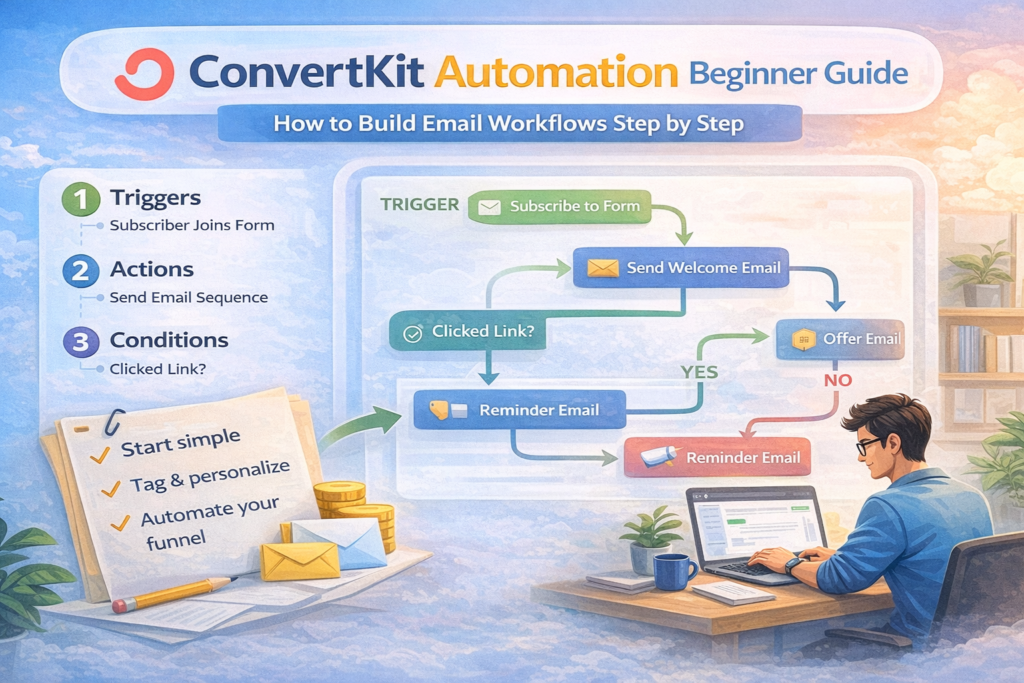
This kit automation for beginner guide explains and shows you how to build automated email workflows step by step. If you are new to email marketing, learning how automation works in Kit will help you send the right message to the right subscriber automatically.
Instead of sending emails manually, automation allows your system to run in the background. When someone joins your list, clicks a link, or makes a purchase, Kit responds instantly. That is why learning automation is one of the most valuable skills for creators and online businesses.
What Is Kit Automation?
Kit automation is a system that automatically performs actions based on subscriber behavior.
Instead of sending the same email to everyone, automation personalizes communication depending on what people do, such as:
-
Signing up for a form
-
Clicking a link
-
Downloading a resource
-
Purchasing a product
With automation, you can:
-
Welcome new subscribers automatically
-
Deliver lead magnets instantly
-
Nurture subscribers over time
-
Promote digital products
-
Segment your audience
-
Build structured email funnels
Once set up, automation runs continuously without manual work.
How Kit Automation Works for Beginners
To understand, you need to know the three core elements that power every workflow.
Triggers in Kit Automation
A trigger starts the automation.
Common triggers include:
-
Subscriber joins a form
-
Subscriber gets tagged
-
Subscriber purchases a product
Actions in Kit Automation
Actions tell the system what to do after the trigger.
Examples include:
-
Send an email sequence
-
Add or remove tags
-
Wait for a specific time
Conditions in Kit Automation
Conditions create different paths depending on subscriber behavior.
Example:
-
If subscriber clicks a link → send offer email
-
If subscriber does not click → send reminder
This allows smarter targeting and personalization.
Step-by-Step Setup:
Follow these steps to create your first automated workflow.
Step 1 — Open the Automation Builder
Dashboard → Automate → Visual Automations → New Automation.
Step 2 — Choose a Trigger
Most beginners start when a subscriber joins a form.
Step 3 — Add an Email Sequence
Create a welcome series with helpful content.
Step 4 — Add Tags
Organize and segment subscribers.
Step 5 — Add Conditions
Send different messages based on behavior.
Step 6 — Publish
Your automation now runs automatically.
Best Strategies for Beginners Using Kit Automation
Start with simple workflows:
-
Welcome sequence
-
Lead magnet delivery
-
Sales funnel automation
-
Re-engagement campaigns
-
Post-purchase follow-up
These provide the biggest impact early.
Why Automation Matters for Email Marketing
Learning Kit Automation for Beginner helps you build systems that work continuously without manual effort.
Automation allows you to:
-
Communicate consistently
-
Deliver personalized experiences
-
Build relationships at scale
-
Save time on repetitive tasks
-
Increase engagement and conversions
Your system works even when you are not actively sending emails.
Common Beginner Mistakes
Many beginners make these mistakes:
-
Creating overly complex workflows
-
Forgetting to tag subscribers
-
Not testing automation paths
-
Sending too many emails too quickly
Start simple and improve gradually.
Final Thoughts
This guide to Kit Automation for Beginner showed how automated email workflows work and how to create your first system step by step. Once you understand triggers, actions, and conditions, you can build automation that grows your audience and supports your business automatically.
Start small, refine your workflows, and let automation scale your communication and revenue.
Further Reading:
Beehiiv vs ConvertKit (2026): Which Newsletter Best for Creators?
FAQs
1. What is Kit automation for beginners?
Kit automation for beginners refers to creating simple automated email workflows inside Kit that send emails based on subscriber behavior, such as joining a form or clicking a link. It helps new creators automate communication without technical complexity.
2. Is Kit automation hard to set up?
No. Kit’s visual automation builder is beginner-friendly. You can create your first workflow in minutes using triggers, actions, and simple conditions.
3. What is the first automation beginners should create in Kit?
Most beginners should start with a welcome email sequence. This automation sends a series of emails automatically when someone subscribes to your list.
4. What are triggers in Kit automation?
Triggers are events that start an automation. For example, when someone joins a form or gets tagged, the automation begins.
5. Can beginners use Kit automation without coding?
Yes. Kit automation requires no coding. Everything is built using a visual drag-and-drop builder.
6. How does Kit automation help grow an email list?
Automation helps deliver lead magnets instantly, nurture subscribers, segment audiences, and send targeted offers. This increases engagement and conversions over time.
7. What is the difference between Kit automation and email broadcasts?
Broadcast emails are sent manually to a list. Automation runs automatically based on subscriber actions, making it more scalable and personalized.
8. How many automations can beginners create in Kit?
The number depends on your pricing plan. Beginners can start with simple workflows like welcome sequences and lead magnet delivery before building advanced funnels.
9. Should beginners build complex workflows?
No. Beginners should start with simple automation systems and improve them gradually as they understand tagging and segmentation.
10. Is Kit better than Beehiiv for automation?
Kit offers more advanced automation and tagging capabilities compared to Beehiiv. If your focus is behavioral targeting and email funnels, Kit may be a stronger option.
© 2026 All Rights Reserved.